MyBatis深入 Mybatis的Dao层实现 介于原始mybatis过于繁琐,
我们采用代理开发方式:
采用Mybatis的代理开发方式实现DAO 层的开发,这种方式是我们后面进入企业的主流。Mapper 接口开发方法只需要程序员编写Mapper 接口(相当于Dao 接口),由Mybatis框架根据接口定义创建接口的动态代理对象,代理对象的方法体同上边Dao接口实现类方法。
Mapper 接口开发需要遵循以下规范:
1、Mapper.xml文件中的namespace与mapper接口的全限定名相同
2、Mapper接口方法名和Mapper.xml中定义的每个statement的id相同
3、Mapper接口方法的输入参数类型和mapper.xml中定义的每个sql的parameterType的类型相同
4、Mapper接口方法的输出参数类型和mapper.xml中定义的每个sql的resultType的类型相同
只需将原先手动的
1 List<User> userList= sqlSession.selectList("userMapper.findAll" );
修改为:
1
2
UserMapperuserMapper= sqlSession.getMapper(UserMapper.class);
MyBatis映射文件深入 一.动态sql语句 1.动态SQL 之< if>
我们根据实体类的不同取值,使用不同的SQL语句来进行查询。比如在id如果不为空时可以根据id查询,如果username 不同空时还要加入用户名作为条件。这种情况在我们的多条件组合查询中经常会碰到。
1
2
3
4
5
6
7
8
9
10
11
<select id="findByCondition" parameterType="user" resultType="user" > select * from User <where> <if test="id!=0" > and id=#{id} </if > <if test="username!=null" > and username=#{username} </if > </where> </select>
2.动态SQL 之< foreach>
循环执行sql的拼接操作,例如:SELECT * FROM USER WHERE id IN (1,2,5)。
1
2
3
4
5
6
7
8
<select id="findByIds" parameterType="list" resultType="user" > select * from User <where> <foreach collection="array" open="id in(" close=")" item="id" separator="," > #{id} </foreach> </where> </select>
二.SQL片段抽取 Sql中可将重复的sql提取出来,使用时用include 引用即可,最终达到sql重用的目的
1
2
3
4
5
6
7
8
9
10
11
12
13
14
15
<!--抽取sql片段简化编写--> <sql id="selectUser" select * from User</sql> <select id="findById" parameterType="int" resultType="user" > <include refid="selectUser" ></include> where id=#{id} </select> <select id="findByIds" parameterType="list" resultType="user" > <include refid="selectUser" ></include> <where> <foreachcollection="array" open="id in(" close=")" item="id" separator="," > #{id} </foreach> </where> </select>
三.MyBatis核心配置文件深入 1.typeHandlers标签 :用来自定义mybatis中没有的数据类型,例如java实体类中的date对象和数据库中的long形的转换关系。
实现:
1.编写转换器:
1
2
3
4
5
6
7
8
9
10
11
12
13
14
public class MyDateTypeHandlerextends BaseTypeHandler<Date> { public void setNonNullParameter (PreparedStatementpreparedStatement, int i, Date date, JdbcTypetype) { preparedStatement.setString(i,date.getTime()+"" ); } public Date getNullableResult (ResultSetresultSet, String s) throws SQLException{ return new Date (resultSet.getLong(s)); } public Date getNullableResult (ResultSetresultSet, int i) throws SQLException{ return new Date (resultSet.getLong(i)); } public Date getNullableResult (CallableStatementcallableStatement, int i) throws SQLException{ return callableStatement.getDate(i); } }
2.注册类型自定义转换器-
1
2
3
<typeHandlers> <typeHandlerhandler="typeHandlers.MyDateTypeHandler" ></typeHandler> </typeHandlers>
2.plugins标签 :
MyBatis可以使用第三方的插件来对功能进行扩展,分页助手PageHelper是将分页的复杂操作进行封装,使用简单的方式即可获得分页的相关数据开发步骤:
①导入通用PageHelper的坐标
②在mybatis核心配置文件中配置PageHelper插件
③测试分页数据获取
实现:
1.导入通用PageHelper坐标
1
2
3
4
5
6
7
8
9
10
11
12
<!--分页助手--> <dependency> <groupId>com.github.pagehelper</groupId> <artifactId>pagehelper</artifactId> <version>3.7 .5 </version> </dependency> <dependency> <groupId>com.github.jsqlparser</groupId> <artifactId>jsqlparser</artifactId> <version>0.9 .1 </version> </dependency>
2.在mybatis核心配置文件中配置PageHelper插件(有顺序)
1
2
3
4
5
<!--注意:分页助手的插件配置在通用馆mapper之前--> <plugin interceptor="com.github.pagehelper.PageHelper" > <!--指定方言--> <property name="dialect" value="mysql" /> </plugin>
3.测试:
①
1
2
3
4
5
6
7
8
@Test public void testPageHelper () {List<User> select = userMapper2.select(null ); for (User user: select){ System.out.println(user); } }
②
1 2 3 4 5 6 7 8 PageInfo<User> pageInfo= new PageInfo <User>(select); System.out.println("总条数:" +pageInfo.getTotal()); System.out.println("总页数:" +pageInfo.getPages()); System.out.println("当前页:" +pageInfo.getPageNum()); System.out.println("每页显示长度:" +pageInfo.getPageSize()); System.out.println("是否第一页:" +pageInfo.isIsFirstPage()); System.out.println("是否最后一页:" +pageInfo.isIsLastPage());
四.MyBatis的多表操作 1.一对一, 查询某一订单属于哪一个用户
①创建order和user实体类,order实体类中封装user对象。
②创建OrderMapper接口
③配置OrderMapper.xml
1
2
3
4
5
6
7
8
9
10
11
<mapper namespace="com.itheima.mapper.OrderMapper" > <resultMap id="orderMap" type="com.itheima.domain.Order" > <result column="uid" property="user.id" ></result> <result column="username" property="user.username" ></result> <result column="password" property="user.password" ></result> <result column="birthday" property="user.birthday" ></result> </resultMap> <select id="findAll" resultMap="orderMap" > select * from orders o,user u where o.uid=u.id </select> </mapper>
2.一对多 查询某一用户有多少订单
①创建order和user实体类,user实体类中封装order的集合对象,
②创建UserMapper接口
③配置UserMapper.xml
1
2
3
4
5
6
7
8
9
10
11
12
13
14
15
16
<mapper namespace="com.itheima.mapper.UserMapper" > <resultMap id="userMap" type="com.itheima.domain.User" > <result column="id" property="id" ></result> <result column="username" property="username" ></result> <result column="password" property="password" ></result> <result column="birthday" property="birthday" ></result> <collection property="orderList" ofType="com.itheima.domain.Order" > <result column="oid" property="id" ></result> <result column="ordertime" property="ordertime" ></result> <result column="total" property="total" ></result> </collection> </resultMap> <select id="findAll" resultMap="userMap" > select *,o.id oid from user u left join orders o on u.id=o.uid </select> </mapper>
注意 :一对多比一对一多collection标签,用来封装列表。
3.多对多 查询用户同时查询出该用户的所有角色
同一对多,只需要修改sql语句:
1 select u.*,r.*,r.id rid from user u left join user_role ur on u.id=ur.user_idinner join role r on ur.role_id=r.id
小结:
一对一配置:使用< resultMap>做配置
一对多配置:使用< resultMap>+< collection>做配置
多对多配置:使用< resultMap>+< collection>做配置
五.Mybatis注解开发 @Insert:实现新增
@Update:实现更新
@Delete:实现删除
@Select:实现查询
@Result:实现结果集封装
@Results:可以与 @Result 一起使用,封装多个结果集
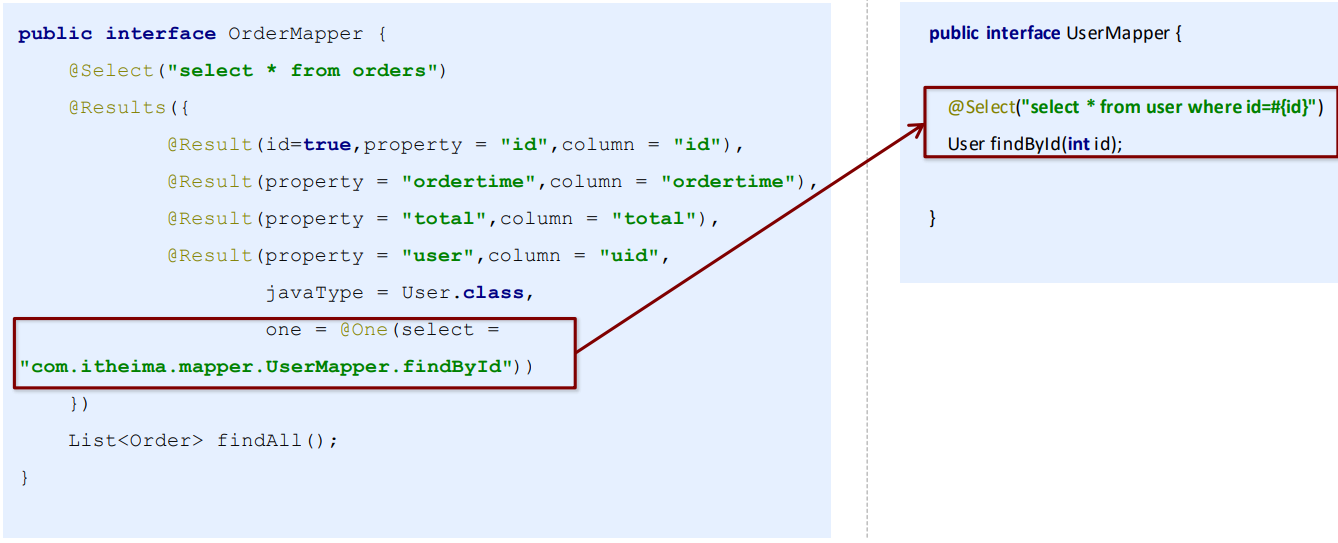
@One:实现一对一结果集封装
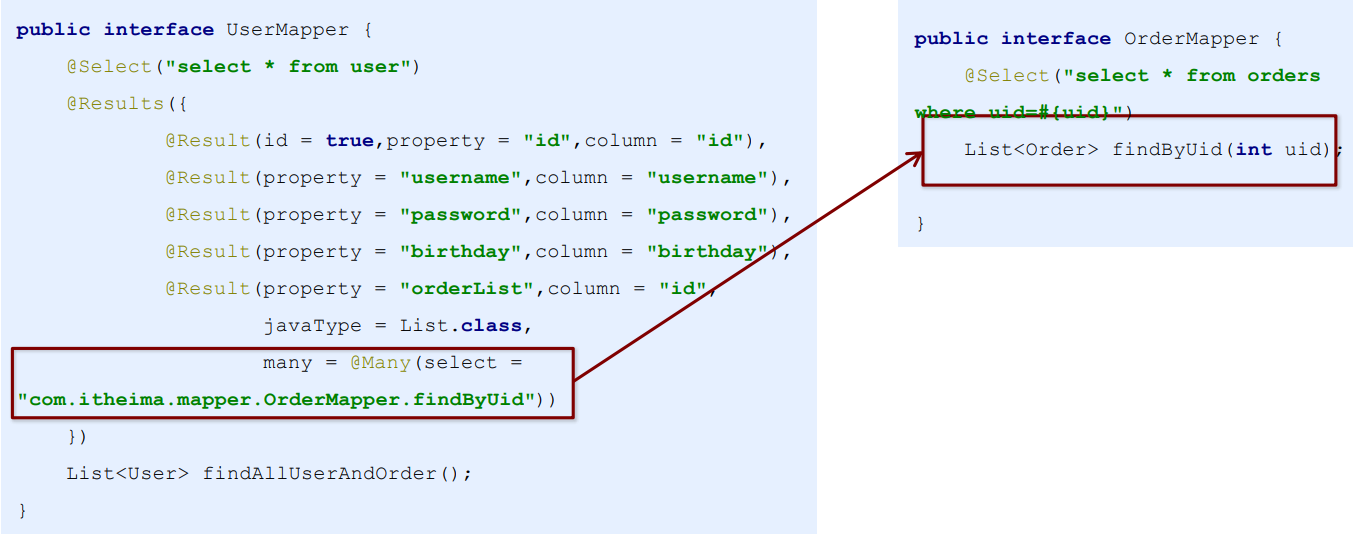
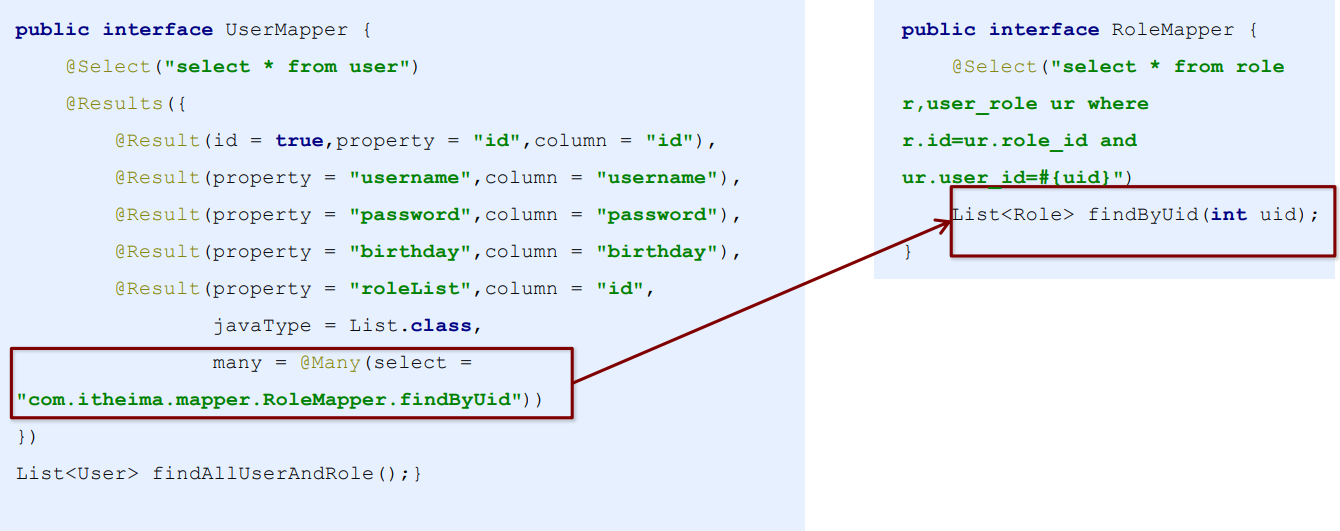
@Many:实现一对多结果集封装
一对一: 如图:
一对多: 如图:
多对多: 如图: